Repository navigation
Add previews of all themes #339
Description

Could we add preview screenshots of the themes similar to how the Helix editor provides preview for its themes?
Reacted by Antoine Stevan, Günter Zöchbauer and Volodymyr Lisovskyi
Reacted by Antoine Stevan
Activity
fdncred commentedon Jan 10, 2023
Sure. Go for it. It would be cool to have a readme in that folder that has screenshots of all the themes that have been provided.
aidalgol commentedon Jan 11, 2023
What should I include in the screenshots to show the various theme colours? Maybe just the same
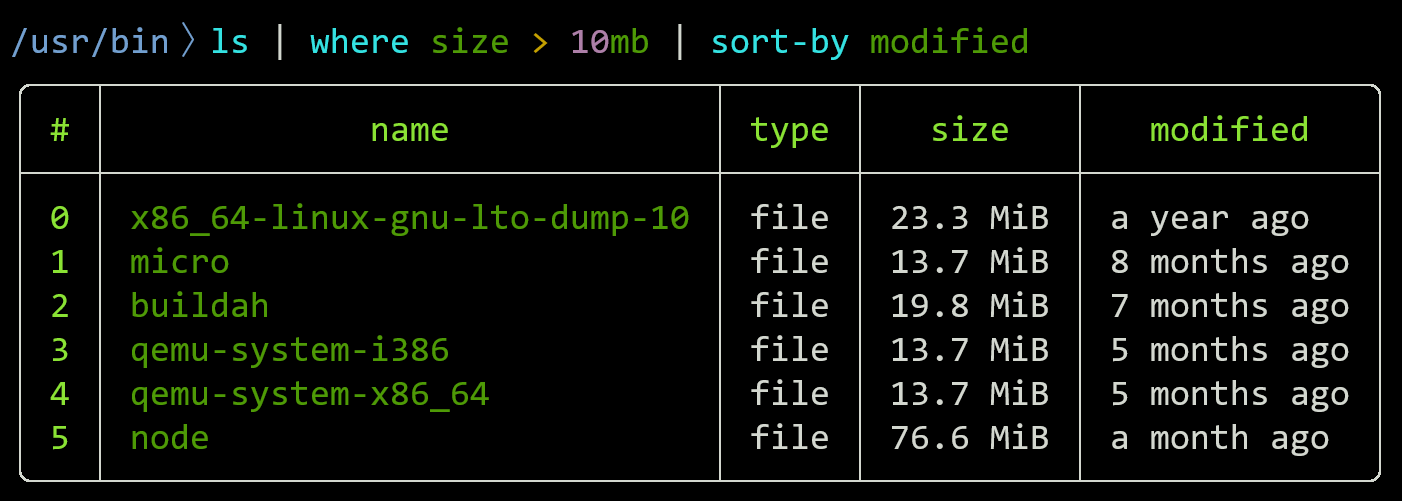
lscommand example on the Nushell website?fdncred commentedon Jan 11, 2023
I think the key is to have something that shows off the theme best. I'm fine with what you've suggested for now. However, it would be nice to have a script in the repo that generates this readme. If there was a script, it should be pretty easy to change whatever the output is.
aidalgol commentedon Jan 12, 2023
I'm going to try figuring out how asciinema does this for video to see whether that would be feasible for automating this.
amtoine commentedon Jan 12, 2023
you could also probably automate screenshot taking with a script which would, for each theme available in
themes/themes/, do the followingand finally update the
READMEto preview all the themes 😋aidalgol commentedon Jan 13, 2023
That would work, but it seems less reliable. Especially as I am on a tabbed window-manager.
amtoine commentedon Jan 13, 2023
mm 🤔
you should be able to make a screenshot of a single window, or even of a particular portion of the screen 😋
fdncred commentedon Jan 14, 2023
Another potential idea is to create "screenshots" without images and just create a markdown page with the appropriate colors and fake image. Or maybe an html page? Not sure exactly.
amtoine commentedon Jan 14, 2023
that could be great 😮
much lighter than raw images 👍
asciinemahas the benefits or being light-weight, i.e. text-based, and nice to look at in a little video format 😌aidalgol commentedon Feb 4, 2023
Looks like GitHub Flavored Markdown (GFM) filters out any colour styling in raw HTML, so it seems we would have to build a website to render themes using HTML and CSS.
Since mentioning wanting to look into asciinema, I have found termshot, which looks like it does exactly what I wanted.
aidalgol commentedon Feb 4, 2023
Blocked on homeport/termshot#102
aidalgol commentedon Jan 13, 2025
The blocking issue in termshot has been fixed.
@fdncred I see you have since added screenshots to the repo. What command did you use to produce the output shown there?
fdncred commentedon Jan 13, 2025
IIRC, @NotTheDr01ds reworked the script but there's a preview script or two under the themes folder. I think this is it. We've also been considering removing all the previews and replacing them with svg files for a smaller repo.
NotTheDr01ds commentedon Jan 13, 2025
Yes, if I can find the time and motivation to finish it up, there's just a bit more to do on
to svg(IIRC) to get it to the point where this script could be much "easier" to run. Right now, I think it's pretty system-dependent, unfortunately. And I probably broke @fdncred's method when adding mine.Kissaki commentedon Apr 19, 2025
Is the work on the svg generating open (visible somewhere) or closed off?
I saw it mentioned in #970 too, but also without any references. @NotTheDr01ds is there something you could be supported with? The "finishing touches" for it to become more system neutral or "easier to run" you mentioned?
fdncred commentedon Apr 19, 2025
This is the last version I have. I have it in a folder called to-svg and you'll need to rename it to mod.nu
mod.txt
Add to-svg mod
Kissaki commentedon May 16, 2026
I used the linked mod.txt as a basis and generated svg for all themes, and a Markdown and html file for previewing them in one file/view.
https://github.com/Kissaki/nu_scripts/blob/themes-svg/themes/theme-previews.md
(There's a html file next to it, those don't render on GitHub, but in a local checkout a flex layout is much denser.)
Looks like at least reverse handling is still missing. (Image with svg above and live Terminal below.)
And if I don't load a theme at all, seems like my color doesn't map correctly. (Image with svg above and live Terminal below.)
My question would be, is the generated svg screenshots still a goal, and a viable goal? What is the minimum coverage and verification where we would make the switch from png to generated svg?
I assume once the conversion works well, the colors and other terminal styles are stable so there's no risk of stuff becoming wrong, gaps, or otherwise a lack of maintainability and verifiability?
I could
attr_reverseviewBoxattribute, and what a good font size/scaling is (so it looks similar to live)I just don't want to invest a ton [more] if we never make the switch anyway.
Also, maybe there should be a separate issue for the theme svg concern? Currently, this ticket and #970 both concern themselves with it, but the original issue is a different concern, just possibly resolved/improved through or with a switch to svg.
fdncred commentedon Jun 1, 2026
I'd like to have svg previews but we'd also have to figure out how to overwrite the repo history to remove the png files to shrink the repo size. The svgs would also need to be very small without clutter not to mention, the colors need to be right.
Bahex commentedon Jun 1, 2026
I wonder if we can do something like:
color_configfdncred commentedon Jun 1, 2026
@NotTheDr01ds had a nushell to svg writer 95% done a year or so ago, iirc.